Showing posts with label Google. Show all posts

Thursday, December 6, 2012

Google Translate 2.5.3


Current Version: 2.5.3
Requires Android: 2.1 and up
Category: Tools
Size: 4.9M
What’s in this version:
• Translate Chinese, Japanese, and Korean by recognizing text with your Camera (horizontal text only, for now).
• Recognize handwriting in more languages:
Afrikaans, Croatian, Czech, Icelandic, Latvian, Lithuanian, Macedonian, Slovak, Slovenian, Ukrainian, Welsh
Details:
Translate text between more than 64 languages.
Translate words and phrases between more than 65 languages using Google Translate for Android. For most languages, you can speak your phrases and hear the corresponding translations.
With Google Translate you can:
• Translate text between 65 languages
• Translate by speaking the text instead of typing it (17 languages)
• Use camera to take a picture and brush text to translate (available on Android 2.3 and above).
• Listen to your translations spoken aloud (40 languages)
• Communicate with another person using speech-to-speech translation in Conversation Mode (ALPHA, 14 languages)
• Display translations in full screen mode to make it easier for others nearby to read
• Star your favorite translations for quick access even when you’re offline
• Access your translation history even when you’re offline
• Spell out the translation of non-Latin script languages (e.g. Chinese, Japanese, etc..) in Latin characters to read it phonetically (e.g. Pinyin, Romaji)
• View additional dictionary results for single words or short phrases
• Push the handwriting button and simply write what you want to translate
Translations between the following languages are supported:
Afrikaans, Albanian, Arabic, Armenian, Azerbaijani, Basque, Belarusian, Bengali, Bulgarian, Catalan, Chinese (Simplified), Chinese (Traditional), Croatian, Czech, Danish, Dutch, English, Esperanto, Estonian, Filipino, Finnish, French, Galician, Georgian, German, Greek, Gujarati, Haitian Creole, Hebrew, Hindi, Hungarian, Icelandic, Indonesian, Irish, Italian, Japanese, Kannada, Korean, Lao, Latin, Latvian, Lithuanian, Macedonian, Malay, Maltese, Norwegian, Persian, Polish, Portuguese, Romanian, Russian, Serbian, Slovak, Slovenian, Spanish, Swahili, Swedish, Tamil, Telugu, Thai, Turkish, Ukrainian, Urdu, Vietnamese, Welsh, Yiddish

Download From Google Play:
Google Translate 2.5.3 On Google Play
Download From Apknew: 
Google Translate 2.5.3 On Apknew
Google Translate 2.5.3

Google Voice 0.4.2.72


Current Version: 0.4.2.72
Requires Android: 2.0 and up
Category: Communication
Size: 5.4M
What’s in this version:
- Fixes for delayed SMS notifications
- Fixes for inbox syncing and duplicate notifications
Details:
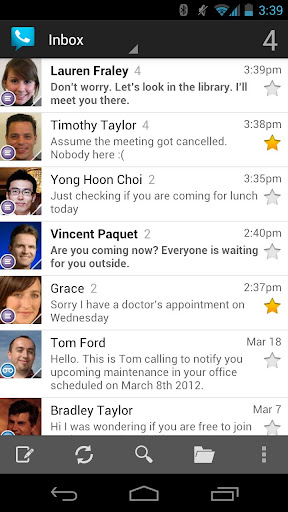
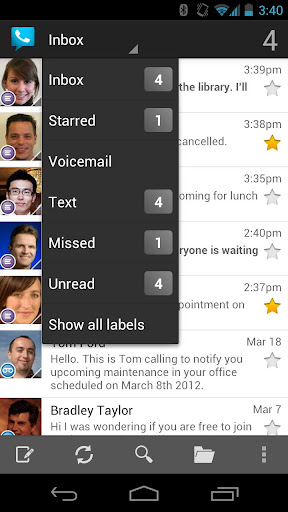
Make cheap international calls with your Google number. Send free textmessages. Place calls and send text messages showing your Google number. Listen to voicemail and read transcripts.
Currently only available in the US.
IMPORTANT: You must open Google Voice at least once after upgrading to route calls.

Download From Google Play:
Google Voice 0.4.2.72 On Google Play
Download From Apknew: 
Google Voice 0.4.2.72 On Apknew
Google Voice 0.4.2.72

Friday, December 2, 2011

Google Maps 6.0.0 WorldWide Navigation Activated


Requirements: for all Android versions
Overview: Get Google Maps with Navigation (Beta), Places, and Latitude
Get Google Maps with Navigation (Beta), Places, and Latitude
*Navigation: Free, voice-guided GPS navigation system
*Places: Find, rate, and get recommendations for places
*Latitude: See friends on the map and check in at places
Keywords: Google Maps, Navigation, Places, Hotpot, Latitude, directions
Recent changes:
Voice and ring tone notifications for Transit Navigation (Beta)
Tablet support for Transit Navigation (Beta)
‘Bubble Buttons’ Lab to add call and navigate buttons to results on the map
How to install version:
1. uninstall current map
2. rename apk to maps.apk
3. move to system/app
4. set permission to
woner : read write execute
others : only read
Or
1. In Titanium Backup, select Maps and make a backup.
2. Select Maps and wipe data, then uninstall.
3. Select Street View and wipe data, then uninstall
4. Install maps.apk
5. Go to market, and reinstall street view.
or ADB
first uninstall Maps from /system/app
Code:
adb remount
adb push /maps.apk /system/app
1. The upgradable version of Google Maps must be placed in /system/app directory, and no installation process, you must first uninstall the original map, official map of any future upgrades can be used directly, there’s no need to uninstall using the Application page or the guide above.
If you already have previous version of wonhere just install maps.signed.apk signed version
Google Maps
Latest version: 6.0 (for all Android versions)
Download Instructions:
Barcode Scanner
Download Google Maps v6.0
Download Google Maps v6.0 apk
Orginal Version :

Wednesday, August 31, 2011

Google Tasks Organizer 3.1.8


Requirements: Android 2.1+
Overview: Sync your todo lists from multiple GMail and Google Apps accounts with one app.

[break]

Organize all your Google Task lists!

Sort tasks by due date, name, custom order, and more.
Repeating tasks move to the next due date.
Set reminders for time-sensitive tasks.

Full version includes:
- Calendar-style date picker
- Collapsible subtasks
- Push tasks to Google & Android Calendar
- Integration with Pure Calendar Widget & Android Agenda Widget
- Full widget customization
- and much more!

What's in this version:
-Switched to a new sync system.
-Fixed Calendar date issues.
-Replaced Instant Send preference.
-Fixed problems with detecting some actions from server.
-Removed non-system accounts.
-Changed Sync Frequency to 4 hours by default.
-Added ability to move a list to a different account through the Edit List screen.
-Fixed bug with editing task name or notes immediately before changing lists


Download Instructions:
http://www.MegaShare.com/3549369

Mirrors:
http://www.filesonic.com/file/1810373304

Friday, August 5, 2011

Google Maps v5.8.0 (World Wide Navigation Activated) Support Unrooted Device Now

Requirements: for all Android versions
Overview: Get Google Maps with Navigation (Beta), Places, and Latitude


*Navigation: Free, voice-guided GPS navigation system
*Places: Find, rate, and get recommendations for places
*Latitude: See friends on the map and check in at places

Keywords: Google Maps, Navigation, Places, Hotpot, Latitude, directions

What's in this version:
Personalize Place pages by uploading pictures from your visit
Manage your starred and recently visited Places in the 'My Places' tab
See descriptive terms for Places in search results and Places pages
Add a new place to Places when checking in

Google Maps 5.8.0 Mod - With World Navigation activated
This map is for the country that cant use navigation on google map. It has been hacked and can be used by any country now.


Download Instructions:
http://www.filesonic.com/file/159636...e-changepn.apk

Mirrors :
http://uploading.com/files/b7b2af27/...-changepn.apk/

Wednesday, August 3, 2011

Google+ v1.0.5

Requirements: Android v2.1+
Overview: Google+ (Google Plus) is still in active development and not yet available to everyone. You need an invitation to sign in.


Google+ for mobile makes sharing the right things with the right people a lot simpler. Huddle lets you send super-fast messages to the people you care about most. With your permission, Instant Upload automatically puts the photos and videos you take into a private album in the cloud, so you can share them anytime, from anywhere. And no matter where you are, the stream lets you stay in the loop about what your friends are sharing and where they’re checking in.

Features:
* Circles let you share the right things with just the right people.
* Stream is where you can get updates from your circles or see what people are saying about things nearby.
* Instant Upload automatically uploads videos and photos to your own private album in the cloud, to make sharing a snap.
* Huddle is super-fast group messaging for everyone in your circles.

Recent changes:
Improved notifications reliability
"_add to circle" notifications shown in bulk
Share stream posts to individual people
Clicking a +mention takes you to the person’s profile
+mentions now autofill from your Circles
Stream no longer resets to top when screen is rotated
Nearby accuracy
Start a 1:1 huddle from a person’s profile or a group huddle from a circle profile
Hide 1:1 huddles
Clickable links in huddles
Improved autocomplete when adding a person to a huddle


Download Instructions:
http://uploading.com/files/6b1bb338/...B%2B1.0.5.apk/

http://www.filefat.com/zlasy1qtt3vf

Thursday, July 28, 2011

Google+ v1.0.2 [Google Inc.]


Requirements:
Android 2.1 +
Overview:
Image Hosted by ImageShack.us
Real-life sharing rethought for mobile.
Google+ (Google Plus) is still in active development and not yet available to everyone. You need an invitation to sign in.
Google+ for mobile makes sharing the right things with the right people a lot simpler. Huddle lets you send super-fast messages to the people you care about most. With your permission, Instant Upload automatically puts the photos and videos you take into a private album in the cloud, so you can share them anytime, from anywhere. And no matter where you are, the stream lets you stay in the loop about what your friends are sharing and where they’re checking in.
Features:
* Circles let you share the right things with just the right people.
* Stream is where you can get updates from your circles or see what people are saying about things nearby.
* Instant Upload automatically uploads videos and photos to your own private album in the cloud, to make sharing a snap.
* Huddle is super-fast group messaging for everyone in your circles.
Download Here
Download

Google Tasks Organizer v3.1.5

Requirements: Android 2.1+
Overview: Sync your todo lists from multiple GMail and Google Apps accounts with one app.
 
[break]

Organize all your Google Task lists!

Sort tasks by due date, name, custom order, and more.
Repeating tasks move to the next due date.
Set reminders for time-sensitive tasks.

Full version includes:
- Calendar-style date picker
- Collapsible subtasks
- Push tasks to Google & Android Calendar
- Integration with Pure Calendar Widget & Android Agenda Widget
- Full widget customization
- and much more!

What's in this version:
Added options for max lines of name and notes and whether to show full name and notes when a task is selected.
Added option for first day of the week in calendar-style date picker.
Improved drag-and-drop movements when subtasks are involved.
Accounts deleted from Android settings can now be properly removed from GTO.
Fixed some intermittent sync issues caused by recent GMail server changes.
Fixed problem where adding several tasks to top of list prevented task movement until following sync.

Download Instructions:
http://www.MegaShare.com/3462355

Mirrors:
http://www.filesonic.com/file/1529866634

Google Maps v5.8.0 ( + Mod with World Navigation activated )(5.8.0) Apk


Requirements: for all Android versions
Overview: Get Google Maps with Navigation (Beta), Places, and Latitude

[break]


*Navigation: Free, voice-guided GPS navigation system
*Places: Find, rate, and get recommendations for places
*Latitude: See friends on the map and check in at places

Keywords: Google Maps, Navigation, Places, Hotpot, Latitude, directions

What's in this version:
Personalize Place pages by uploading pictures from your visit
Manage your starred and recently visited Places in the 'My Places' tab
See descriptive terms for Places in search results and Places pages
Add a new place to Places when checking in

Google Maps v5.8.0 Mod - With World Navigation activated
This map is for the country that cant use navigation on google map. It has been hacked and can be used by any country now.

Features:
worldwide navigation using Google Maps Directions
map tiles caching on SD card
force-enable MT. If you're on Eclair or some custom Donut and don't have multitouch zooming, then maybe this will enable it.
force-enable Buzz feature
fix for map shift issue in China
option to hide zoom buttons
installable on non-rooted devices

How to install re-sign version:
1. In Titanium Backup, select Maps and make a backup.
2. Select Maps and wipe data, then uninstall.
3. Select Street View and wipe data, then uninstall
4. Install maps5.5.0-ownhere-resign.apk
5. Go to market, and reinstall street view.

or ADB

first uninstall Maps from /system/app
adb remount
adb push /maps5.8.0-ownhere.apk /system/app

1. The upgradable version of Google Maps must be placed in /system/app directory, and no installation process, you must first uninstall the original map, official map of any future upgrades can be used directly, there's no need to uninstall Uninstall using the Application page or the guide above.

Note:
For those who get the "Login Failed" message, and don't get the three warning triangles .

1. Install original maps from market.
2. Sign in and join latititude (or not join latitude, I use it so heh)
3. Back up maps in titanium, app and data.
4. Wipe date and uninstall maps
5. Install resign version. DO NOT RUN, reboot right after installing.
6. After reboot, go to titanium and restore DATA only.

Download Instructions:
maps5.8.0-ownhere-testkeyresign.apk
http://www.filesonic.com/file/1534909634
http://www.filefat.com/7zgv8pk2jqrz
http://www.multiupload.com/CNM1ODQS30

maps5.8.0-ownhere.apk
http://www.filesonic.com/file/1534909624
http://www.filefat.com/mhjys9nb9ixc
http://www.multiupload.com/GI76SCEBB6
Related Posts Plugin for WordPress, Blogger...